Point your pen. Comment. Improve.
AI builds it.
You stay in control.
Understand what your AI built. Comment on anything, track changes, and improve it with your coding agent.
Works with Claude Code and Codex CLI, right inside VS Code.
Free in VS Code. Share and review with your team on the web — no VS Code needed.

I vibe-coded my apps. They worked.
But did I really understand them?
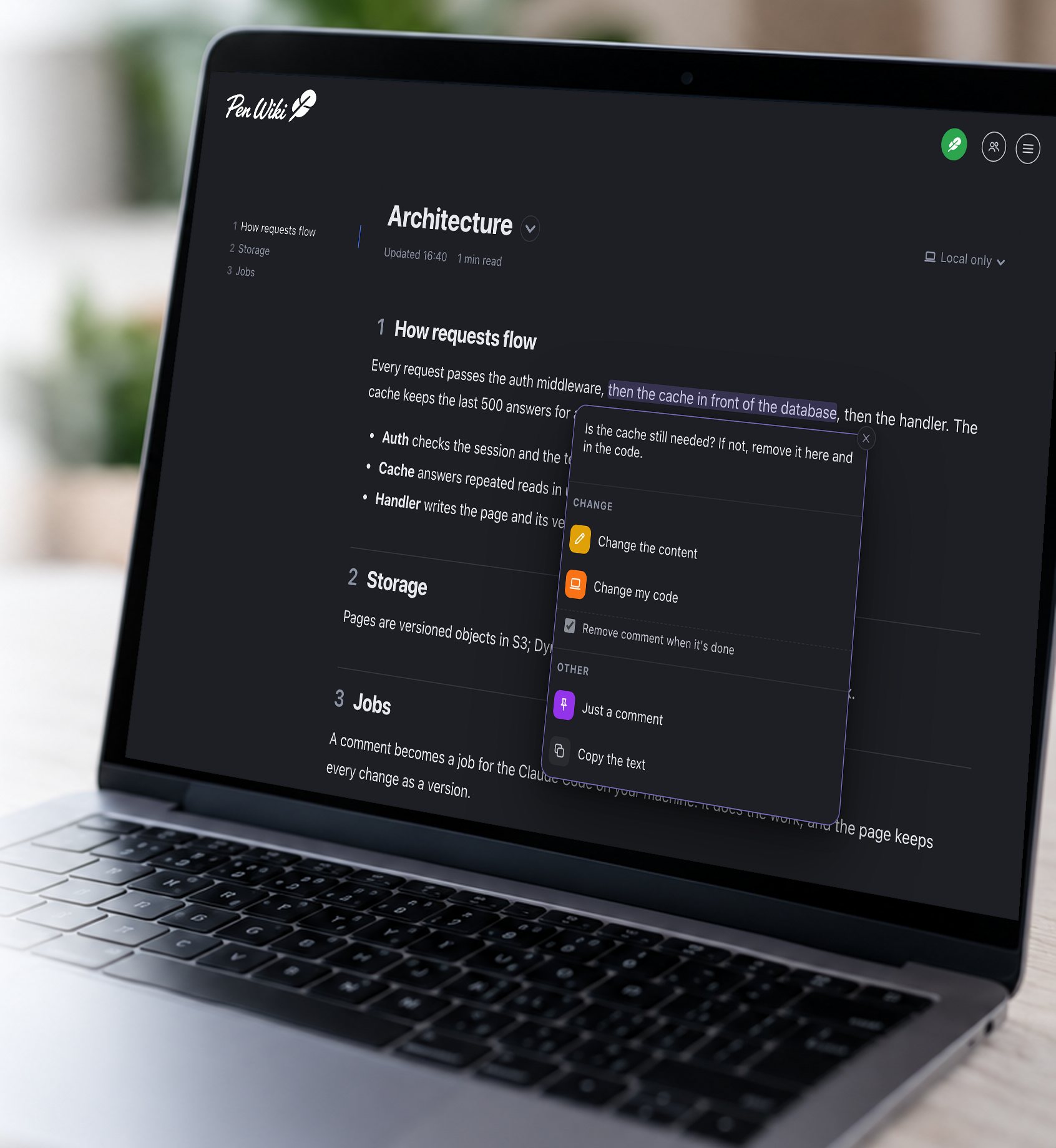
Point your pen. Comment. Improve.
Select any text in your project's Markdown files and write what you want. Then choose what your agent does:
Your agent rewrites that part of the page.
Your agent changes the code on your machine to match.
It answers under your comment. The page stays as it is.
Run it again.
See what changed.
A Guide is a Markdown page that tells your coding agent what to check or document. Write it once. Run it whenever your project changes.
Check your project
Run a Guide. Your agent reads your code and creates a clear report about your features, architecture, security, or anything else you want to understand.
See what changed
Run the same Guide again. Pen Wiki compares the results and shows what's fixed, new, worse, or changed. Anything it could not confirm is marked Unconfirmed, never fixed.
- FixedAuthentication now checks permissions
- NewMissing rate limit on login
- WorseError handling no longer meets your rules
- UnconfirmedBackups restore — not checked this run, so not counted as fixed
Every run stays on the Guide's timeline: when you last checked, what changed since, and whether your code has moved on.
Decide what to improve
Point at a finding, leave a comment, or choose Fix with Claude (or Codex). It shows its plan and waits for your approval, then makes the change on a separate branch. Run the Guide again to verify.
You decide. Your agent does the work. You verify.
What can you do with Guides?
Document its features, architecture, components, and dependencies.
See what was added, changed, or removed since the previous run.
Discover new risks, fixed issues, and problems that still need attention.
Compare your code against your own architecture, security, or quality rules.
Check what changed, what passed, and what still needs attention.
Your guides and reports are Markdown files. Keep them with your project and use them again.
Every page knows when its code moved on.
Pen Wiki watches the code each page talks about. One word under the title says where the page stands: Checked, Source changed, or Outdated, with the files that changed.
Source changed means the code moved since, so check or run it again. Outdated means a check found places that no longer hold, and your agent comments on each one. Or mark the page as checked yourself.
src/auth/login.tschangedsrc/auth/session.tschangedsrc/auth/legacy.tsgonesrc/api/routes.tssame
Every page and every report, with git or without.
Pin your work. Build your wiki together.
Pin your documents, Guides, and reports to a shared wiki.
Your teammates and clients can explore, comment, and review in their browser — no VS Code or coding agent required.
Feedback syncs back to your editor, where you decide what your coding agent does next.
14 days free · Per active user
Your AI. Your machine. Your choice.
Pen Wiki for VS Code is free.
Pen Wiki never sees your code and runs no AI of its own. You use your existing coding agent and subscription.
Your pages stay on your machine until you pin one to Pen Wiki for Teams.